
Deadline Afterlife Processing Beginner Guide: Station 9 Basics
Operating Station 9 requires pulling souls from the line, reading their terminal records, applying active directives at the press, and routing stamped spheres to hatches A or B before the shift deadline bell rings.
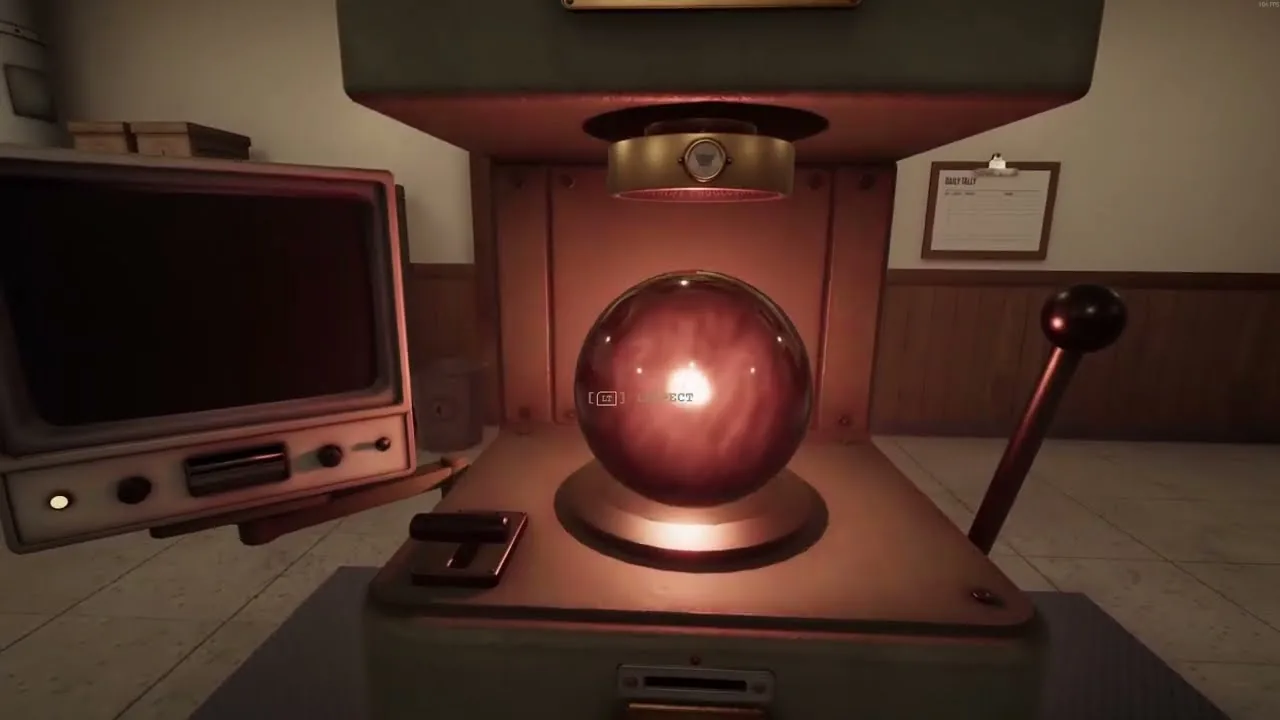
Operating Station 9 requires pulling souls from the line, reading their terminal records, applying active directives at the press, and routing stamped spheres to hatches A or B before the shift deadline bell rings.
Daily Station Routine and Shift Workflow
Every workday at Station 9 follows a rigid procedural cycle. Before interacting with any equipment, you must pull the lever at the time recorder to clock in. The wall clock activates after your first shift, counting down the shift duration. Unprocessed souls remaining when the timer strikes zero count against your record.
After clocking in, pull the feeder lever to bring a soul orb down the line. Carry the orb to the press console and place it into the cradle. Seating the soul causes the amber terminal to print three lines detailing fragments of the subject's earthly life. Review these soul fragments carefully against the active directives board.
Once you determine the correct disposition, set the verdict lever to either Ascend (up) or Descend (down) to choose between heaven or hell. Pull the main compression lever down firmly to apply the red wax seal bearing your operator number. After stamping, carry the soul to the appropriate wall chute:
- Disposition A receives ascending souls destined for upper routing.
- Disposition B receives descending souls routed downward.
Dropping an orb into a hatch drops a paper slip into the tray below. When the shift deadline bell rings, collect all paper slips from both collection boxes. Insert these slips one by one into the wage machine and pull its lever to tally your earnings into a physical wage claim ticket. Take the ticket to the reconciliation window counter to collect wages, review overnight audit notices, and submit purchase requisitions before pulling the punch clock to leave.
Directive Priority and Auditing Rules
Directives posted on the station board govern all verdicts. If multiple directives apply to the same soul, the directive with the lowest number prevails. Overnight audit checks review your processing choices, charging any incorrect disposition against your operator standing.
The governing rules posted across shifts include:
- Directive D-02 (Discretion Provisional): When no formal directive clearly applies, the operator decides based on personal conscience during their probationary status.
- Directive D-03 (Preservation of Life): Any subject whose death directly resulted from preserving another person's life receives an Ascend verdict.
- Directive D-04 (Taking of Innocent Life): Subjects responsible for deliberately taking an innocent life receive an automatic Descend verdict, with intent treated as conclusive.
- Directive D-07 (False Testimony): Any subject whose false testimony or fabricated evidence caused the loss of life or liberty of another person must descend, even if the statements were made under duress.
- Directive D-11 (Theft): Any subject who committed theft must be designated Descend regardless of the monetary value, moral motive, subsequent restitution, or full reparation.
Audits flag strict technical violations. For example, returning stolen property decades later or stealing food to supply disaster shelters still violates Directive D-11, resulting in an audit penalty if marked Ascend.
Station Upgrades and Requisition Orders
Wages earned at the end of each shift can be spent at the reconciliation window counter using the requisition order form. You must select your item with the pen, sign the confirmation sheet, and return the pen for the equipment to arrive before your next shift. Choosing improvements from the catalog shortens processing times and prevents backlog errors.
| Upgrade Option | Functional Impact | Requisition Price |
|---|---|---|
| Faster Terminal | Accelerates the amber text print speed on the desk monitor | 8 to 18 Credits |
| Rail Grease | Speeds up the feed line so soul orbs roll to the station quicker | 15 Credits |
| Commit Lever Counterweight | Adds weight to the press arm for smoother, faster stamping | 20 Credits |
| Die Mechanism Lubrication | Frees the sticky verdict die to switch positions rapidly | 25 Credits |
| Operator Boots | Increases walking speed between the feeder line and chutes | 40 Credits |
Shift Five Retained Soul Procedure
During Shift 5, the automated line experiences an incoming message interruption where the shift clock holds temporarily. The terminal attempts to read Subject 5099 but generates an error reading "Subject unreadable classification error: Insufficient data retained for reclassification."
When this occurs, take the printed retention order form from the tray and insert it into the press slot. Stamp the soul orb directly using the press mechanism, which imprints the destination data onto the surface. The assigned target is Floor R, Aisle 8, Cradle 302.
Carry the retained orb out through the retention exit door into the lift. Select Floor R, proceed past Gate R1 into the dark storage corridor, and navigate past the numbered bays to Aisle 8. Deposit the soul into Cradle 302. Once seated, retrieve the illuminated soul at Bay 461 before returning to the station office to finalize your probationary review paperwork.
Related Guides
Confirmation Lever
Understand the controls, input updates, and catalog upgrades required to operate the station judgment lever smoothly without physical mouse dragging.
Press Guide
Understand how to operate the press mechanism, apply terminal directives accurately, and purchase station upgrades to handle soul quotas efficiently.